ParcelCam: Video proof-of-packing for e-commerce shipping workflows and disputes
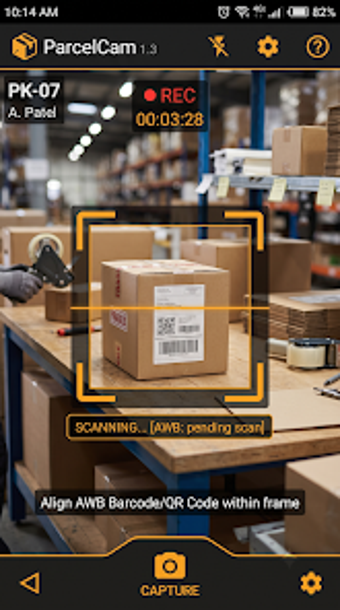
ParcelCam by Oni App is an Android app designed for e-commerce sellers and warehouse teams to document packing and shipping processes. It uses the device camera to scan shipping labels and automatically start a recorded session that embeds tracking data and tamper-resistant watermarks. Key functions include automatic scan-to-record, 1080p video capture with adjustable bitrate, barcode scanning, and smart file naming. The app suits marketplace sellers and logistics operators needing verifiable packing evidence for dispute resolution.
What is ParcelCam used for?
ParcelCam creates a time-stamped, visual record of each outbound order so sellers can present evidence in shipment disputes. The app is built around a single professional function: produce a searchable "Proof of Packing" video per order. It records the packing process with embedded metadata and hard-coded watermarks, which the developer describes as protection against missing-item and damage claims, positioning the tool as an evidence-capture system for e-commerce operations.
How does ParcelCam change the packing workflow?
The app removes a manual start step by using barcode recognition to trigger recording, which the developer calls zero-touch recording. Typical workflow steps the app supports include:
- scan shipping label to start video capture
- capture packing with an overlaid tracking-number watermark
- auto-name the file using tracking and marketplace tags
Is ParcelCam straightforward for teams to adopt?
Adoption hinges on hardware and workflow fit: the app runs on Android devices and requires a camera with autofocus for reliable barcode scanning. The built-in barcode scanner supports standard shipping labels, which lowers setup work for operations that already print conventional carrier labels. An offline mode exists as a Pro feature, which affects teams that pack in areas without consistent connectivity; administrators should consider that when designing a packing station layout.
How does it handle storage, search, and compatibility?
The app stores videos locally by default and provides batch deletion and backup-status indicators to manage on-device archives. Search is practical: videos are named by tracking number and marketplace tags so staff can retrieve footage by entering a tracking ID. Recording quality options include 1080p and adjustable bitrate, balancing evidence fidelity against file size. Supported carriers and platforms are broad, covering major couriers and popular marketplaces relevant to high-volume sellers.
ParcelCam fits evidence-focused sellers who manage their own archives
ParcelCam is a practical option for marketplace sellers and warehouse teams that need auditable packing records and local control over footage. It favors operations prepared to manage device-based archives and Android hardware with autofocus cameras. Organizations that require centralized, cloud-first archives or cross-platform desktop capture should compare other workflows before committing, since the app centers on device-held video evidence rather than cloud-native sharing.